.png)
Task List Template for Teams: How to Build One Your Team Will Actually Use
- Apr 1
- 5 min read
A task list your team will actually use is built on four things: clarity (every task is unambiguous), ownership (one person is responsible per task), priority (the list is ordered, not flat), and the right tool (one shared system, not scattered across apps). Most task lists fail because they miss one or more of these.
Key Principle A task list is only as useful as the behavior it creates. If your team isn't updating it, the problem is usually unclear ownership, too much friction to add tasks, or a tool that doesn't match how work actually flows. |
Why Most Team Task Lists Fail
Team task lists fail for predictable reasons. Understanding them upfront saves you from building a system that nobody uses.
The most common failure modes:
Tasks are vague — 'update the report' tells nobody what to actually do
No single owner — tasks assigned to a team or 'everyone' get done by no one
No priority order — everything looks equally urgent, so nothing gets done first
It lives in the wrong place — a spreadsheet nobody checks or a tool that creates friction
Reactive and operational work is excluded — the list only captures planned tasks, leaving real work invisible
Nobody updates it — the list becomes stale and trust in the system disappears
The fix for all of these is a structured approach to how you design your task list from the start.
What Should a Team Task List Include?
A well-structured team task list has consistent fields for every entry. Inconsistency is what makes lists untrustworthy.
Mandatory fields for every task:
Task title — clear, action-oriented (e.g., 'Draft Q3 budget proposal' not 'Budget')
Owner — one person, not a group
Due date — a specific date, not 'ASAP'
Priority — High, Medium, or Low (or a numerical system)
Status — Not Started, In Progress, Blocked, Complete
Optional but useful fields:
Parent project or goal — so the task connects to something bigger
Estimated effort — helps with workload planning
Dependencies — tasks that must complete before this one starts
Notes or context — relevant information the owner needs
How to Structure a Task List Template Your Team Will Actually Use
The structure of your task list template matters as much as what goes in it. Here is a proven approach used by high-performing teams:
Group tasks by project or work area — not by person. This gives managers a clear view of initiative progress.
Use a clear status system — keep it simple: Not Started, In Progress, Blocked, Done. Avoid overly granular statuses that nobody maintains.
Keep the list flat, not nested — deep nesting creates complexity. Use separate child tasks or sub-tasks only when genuinely necessary.
Review the list weekly — stale tasks destroy trust in the system. Build a habit of pruning and reprioritizing every week.
Add new work before you start it — not after. Capture-first behaviour is the most important cultural habit to build.
What Is the Best Format for a Team Task List?
The best format for a team task list depends on how the team uses it. There is no single right answer, but the most effective formats share common traits: they are visible to the whole team, easy to update, and connected to the broader work system.
Format | Best For | Limitation |
Spreadsheet | Simple, small teams | No automation, hard to maintain |
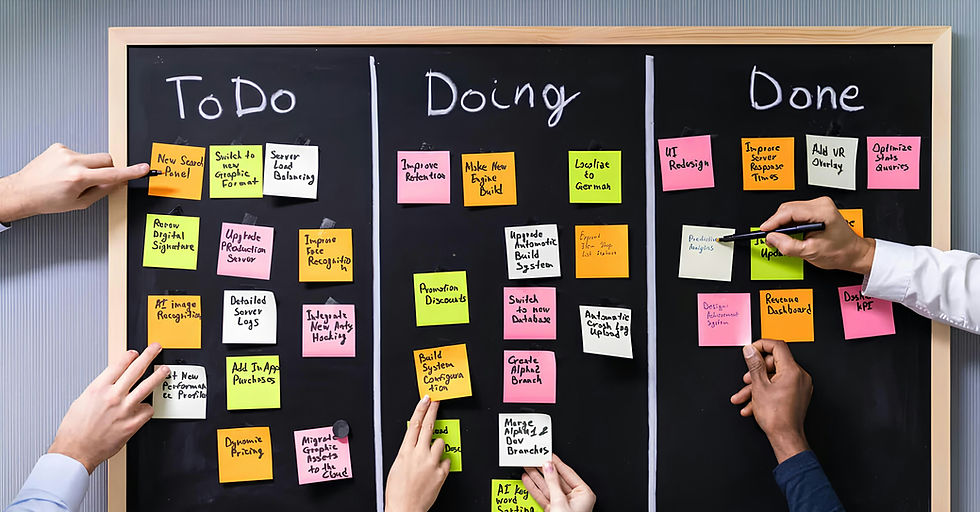
Kanban board | Visual workflow teams | Less useful for deadline-driven work |
List view in a task tool | Task-heavy teams | Can become overwhelming at scale |
Gantt / timeline | Project-heavy teams | Doesn't handle operational work |
AI-native work platform | Teams managing all work types | Requires upfront configuration |
For most teams beyond 10 people, a dedicated task management tool outperforms spreadsheets immediately. The manual maintenance cost of spreadsheets grows faster than the team does.
How to Get Your Team to Actually Use the Task List
Building the list is the easy part. Getting adoption is the hard part. Here is what works:
Make it the source of truth — if work gets discussed in a meeting, it goes into the task list. No exceptions.
Keep the entry barrier low — tasks should take under 30 seconds to add. Complex intake forms kill adoption.
Use it in meetings — review the task list in standups and check-ins rather than asking for verbal updates. This reinforces the habit.
Celebrate task completions — visible progress (even a status change to 'Done') motivates teams.
Remove friction for updates — if updating tasks requires switching contexts or logging into a separate tool, people won't do it.
Leadership behaviour matters most. If managers reference the task list in every conversation, the team will maintain it. If managers ask for verbal updates instead, the list will die.
How Does a Task List Connect to Broader Work Management?
A standalone task list is useful. A task list connected to your projects, OKRs, and operational workflows is transformational.
When individual tasks are tied to goals, leaders can see in real time whether execution is on track. When tasks are connected to projects, blockers surface before they cascade. When all work — planned and reactive — lives in one system, AI can surface insights that would otherwise require manual analysis.
This is the evolution from task list to work management platform. It is not about adding more complexity — it is about making existing work visible in one place.
Frequently Asked Questions
What should a team task list include?
Every task should have a clear title, single owner, due date, priority level, and status. Optional but useful: the parent project, effort estimate, and any dependencies.
What is the best task list template for teams?
The best task list template has consistent required fields (owner, due date, priority, status), groups work by project rather than person, and lives in a shared tool the whole team can access and update in real time.
Why won't my team use the task list?
The most common reasons are unclear ownership, too much friction to add tasks, no consistent review habit, and a list that doesn't reflect real work (especially reactive and operational tasks). Fix the structure first, then build the habit.
Should a task list include reactive and operational work?
Yes. If only planned project tasks appear on the list, the list is incomplete and trust breaks down quickly. Reactive work — escalations, support requests, ad-hoc asks — should be captured as tasks the same way planned work is.
How is a task list different from a project plan?
A project plan maps the full scope, milestones, and timeline of a defined initiative. A task list captures individual units of work — including work that falls outside any formal project. Both are necessary and should ideally live in the same system.
How does AI help with task list management?
AI can surface which tasks are at risk of missing their deadline, recommend priority adjustments based on dependencies and workload, and auto-generate status summaries for stakeholders — reducing the manual overhead that kills task list adoption.
Ready to build a task list your team will actually use? MindStaq gives you the structure, AI-native insights, and unified work management system to make it work. Start free or book a demo today.


